 Dealership Workflow
Loaner agreements
Loaner car agreements for dealerships
Dealership Workflow handles loaner and borrowed-car agreements for the service drive. Check a car out with the borrower’s license, insurance, odometer, fuel and walk-around photos, get the agreement signed in person or by emailed link, then check it back in and see mileage, late-return and fuel charges before the invoice.
30 minutes with the founder, on your store’s real deal flow.
What goes into a loaner agreement at check-out?
A check-out captures the borrower, the car and its condition: name, email and address, driver license, insurance carrier and policy, RO number and reason, odometer, fuel, tag and expected return date.
The car can come from your loaner fleet, from inventory, or be added on the spot. Walk-around photos cover front, rear, both sides, interior, odometer, license and insurance card.
AI fill from a photo or PDF
Snap the license and insurance card or upload a PDF; AI reads the fields and a person checks them before saving.
Pull from a recent deal
If the borrower bought from you, license and insurance details can come from their deal.
How does the customer sign the loaner agreement?
The borrower signs either in person on the advisor’s device or from a signing link sent by email, set store by store.
The agreement is a filled PDF signed through Get Docs Signed, with an optional second signature from a manager. Re-sending voids the old link, so only one live agreement exists.
What happens when the loaner comes back?
At check-in you record odometer and fuel and take return photos, and the system works out mileage overage, late-return, fuel and damage admin charges from your store’s settings.
Invoices can be issued, emailed as a PDF, marked paid or voided, and labeled “Loaner” or “Rental”. Extending an agreement emails the borrower the new return date.
How do you keep track of overdue loaners?
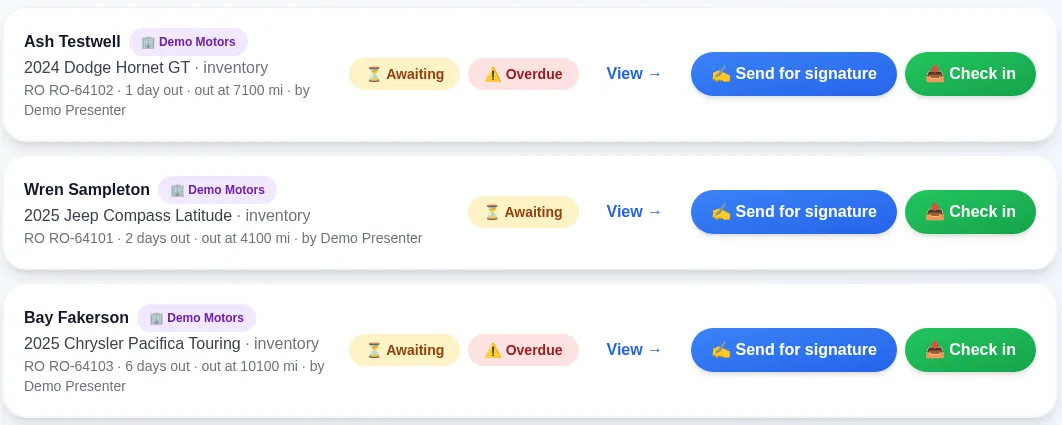
The Active tab shows every car out with days out and an Overdue count, and optional daily emails can remind borrowers and staff.
Return reminders
Optional email to the borrower 24 hours before the car is due.
Overdue alerts
Optional daily email to the staff member who checked the car out, listing their overdue loaners.
Fleet age alert
Optional one-time email when a loaner reaches the number of days in the fleet you set.
History and print
Fleet, history, demo assignments, driver history and a printable active sheet for the service podium.
FAQ
Frequently asked questions
What is a loaner car agreement?
A loaner car agreement is the contract a dealership signs with a customer who borrows a vehicle, usually while their own car is in service. It records the borrower, insurance, the car’s condition and mileage, and the return terms.
Can customers sign the loaner agreement on their phone?
Yes. Each store chooses an emailed signing link or signing in person on the advisor’s device.
Does it text customers?
No. Loaner reminders and notices go by email only, and each reminder type can be turned off.
Can we charge for mileage, fuel or late returns?
Yes. Check-in works out mileage overage, late-return, fuel and damage admin charges from your settings, and the invoice can be emailed as a PDF.
How is Dealership Workflow priced?
Priced per rooftop · unlimited users · month to month · the core platform doesn’t need a DMS connection · exact quote on a 30-minute demo with the founder.
Keep reading
What else does Dealership Workflow handle?
This is one job inside a bigger system. The deal workflow software home page covers the whole deal folder, from deposit to funded.
Dealer trades
Log units traded between stores in your group: inventory, DMS posting, the money transfer, and what is still owed.
Read more →Missouri temp tags and lien filing
A Chrome extension fills the Missouri temp-tag and lien-filing websites from the deal record. More states can be mapped.
Read more →Contracts in transit
Unfunded deals by age, a lender scorecard and funding days, so floorplan carry stops hiding.
Read more →
See it on your own deals
A 30-minute demo with the founder, built around how your store works today.
Book a DemoPriced per rooftop · unlimited users · month to month · the core platform doesn’t need a DMS connection · exact quote on a 30-minute demo with the founder.
Last updated: