 Dealership Workflow
Contracts in transit
Contracts in transit tracking for car dealers
Dealership Workflow tracks contracts in transit for car dealerships: every signed, unfunded deal on one screen, aged by the day into 0–3, 4–7 and 8+ day buckets, with lender, amount and status. A lender scorecard shows dollars out and average days to fund, so the store knows which banks are holding its money.
30 minutes with the founder, on your store’s real deal flow.
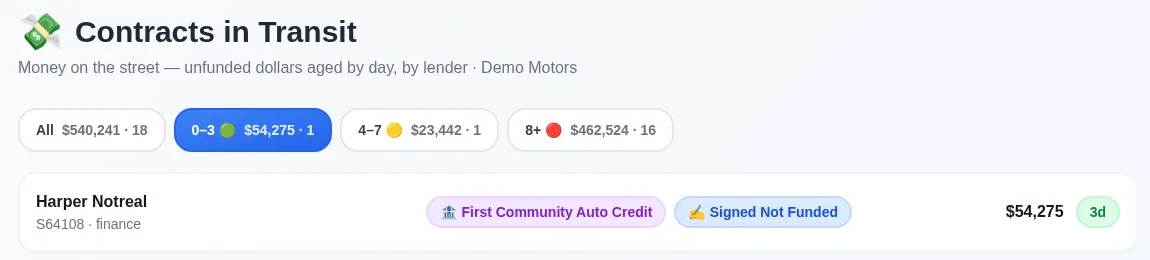
How are contracts in transit aged?
Each unfunded deal counts days from the contract, and the page groups them into 0–3, 4–7 and 8+ day buckets with the dollars and deal count on each.
The oldest deals sort to the top. Each row shows the customer, stock number, deal type, lender, status, amount and days out, and one click opens the deal folder. Statuses your store marks as a funding delay get their own flag, so a stuck deal never looks like a normal one.
Which lenders are slowest to fund?
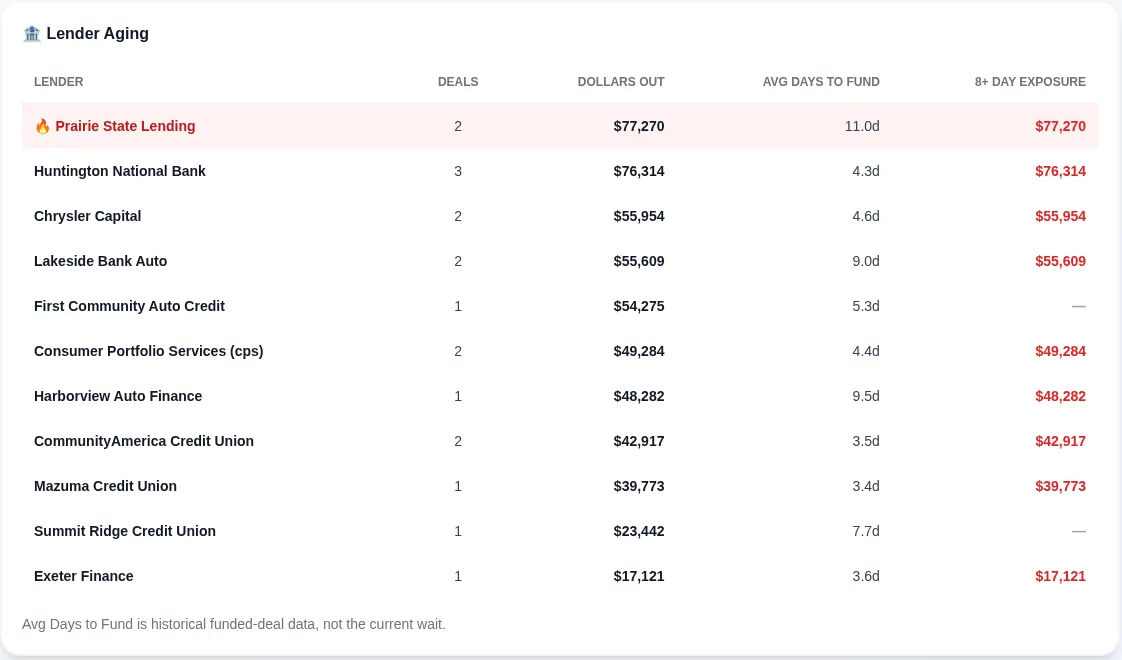
The lender scorecard answers that per lender: deals out, dollars out, average days to fund and the dollars sitting past 8 days.
The lender with the most money past 8 days is highlighted. Average days to fund comes from your own funded history, so it is the lender’s track record, not today’s wait. Name variants of the same bank are merged into one row.
What do slow-funding contracts cost a dealership?
Every day a contract sits unfunded, the car is gone but the money isn’t, and the store keeps paying floorplan interest on cash it has already earned.
Multiply the dollars in transit by your floorplan rate and the days out, and the carry adds up fast across a month of deals. Cutting even a couple of funding days, by catching missing stips and re-signs before the contract ships, is money back on the books.
Funding velocity report
A monthly view of average daily balance, average time to fund, deals in the streets and deals funded in 3 days or less, with a one-page PDF.
Dashboard tiles
Dollars on the street, deals 8+ days old and the slowest lender sit on the store dashboard.
Where does the funding data come from?
Funding data comes from the deal itself: AI reads the signed contract to pick up the lender and amount financed, and the office can enter or correct lender, amount and funded date by hand.
Because the deal folder is already where the contract lives, there is no separate CIT spreadsheet to keep in sync. The core platform does not need a DMS connection for this.
FAQ
Frequently asked questions
What are contracts in transit?
Contracts in transit are retail installment contracts a dealership has signed with a customer and sent to a lender, but the lender hasn’t funded yet. The car has left the lot and the money hasn’t arrived.
How many days is too long for a contract in transit?
Every store sets its own target, but deals past 8 days are where the page flags exposure, because that is usually a stip, signature or lender problem that someone needs to chase.
Can a dealer group see contracts in transit across rooftops?
Yes. A group view rolls up every rooftop that uses contracts in transit, with a badge showing which store each deal belongs to.
Does it need a DMS connection?
No. Contracts in transit runs on the deal folder and the signed contract. A DMS connection is only needed for the optional DMS add-on.
How is Dealership Workflow priced?
Priced per rooftop · unlimited users · month to month · the core platform doesn’t need a DMS connection · exact quote on a 30-minute demo with the founder.
Keep reading
What else does Dealership Workflow handle?
This is one job inside a bigger system. The deal workflow software home page covers the whole deal folder, from deposit to funded.
F&I cancellations and chargebacks
Every cancellation from the request to the refund, with the chargeback amount and who it goes to.
Read more →D.E.A.D. mistake checks
Catches deal mistakes, like odometer miles that don’t match the bill of sale, before the deal leaves the building.
Read more →DMS add-on
Optional: DMS dashboards, Customer Intelligence and email campaigns from a DMS data connection.
Read more →Dealer trades
Log units traded between stores in your group: inventory, DMS posting, the money transfer, and what is still owed.
Read more →Loaner agreements
Sign loaner agreements on screen, see days out and miles out, and check vehicles back in.
Read more →
See it on your own deals
A 30-minute demo with the founder, built around how your store works today.
Book a DemoPriced per rooftop · unlimited users · month to month · the core platform doesn’t need a DMS connection · exact quote on a 30-minute demo with the founder.
Last updated: