 Dealership Workflow
D.E.A.D. mistake checks
Deal mistake checks for car dealerships
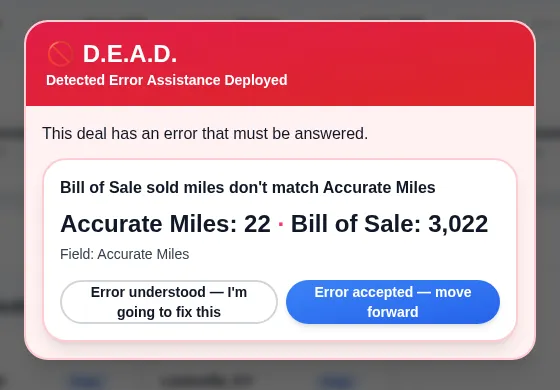
D.E.A.D. (Detected Error Assistance Deployed) checks a deal for mistakes before it moves on. AI reads the bill of sale and compares its VIN and odometer miles with the deal and the accurate-miles lines on the checklist. A mismatch opens an alert that someone must answer, fix it or accept it, before documents go out.
30 minutes with the founder, on your store’s real deal flow.
 (opens the full-size image)
What deal mistakes does D.E.A.D. catch?
D.E.A.D. catches odometer and VIN mistakes between the bill of sale, the deal and the checklist.
Odometer mismatch
Bill of sale miles that don’t match the accurate-miles line for the sold car, trade 1 or trade 2. One mile off counts.
VIN mismatch
A bill of sale VIN that doesn’t match the deal’s VIN, compared on all 17 characters.
Blank miles
A miles line left empty for the sold car, or for a trade the deal has.
Round trade miles
Trade miles that end in an exact thousand, like 181,000, which usually means a guess.
Inventory miles
Sold miles that aren’t higher than the miles recorded when the car was looked up in inventory, or a car that wasn’t found in inventory.
Where do the numbers come from?
AI reads the bill of sale from the signed packet when it is uploaded, and the other side of each check is what your team entered on the deal.
Scanned pages are read too. The read only compares; it never changes the deal. The miles lines are typed by the salesperson, never filled in for them, so the check compares two separate records.
When does the check run, and what happens when it finds a mistake?
The check runs when the signed packet is uploaded, when a miles line is saved, and again before documents are sent for signature or printed.
A mistake opens a popup that can’t be closed until it is answered. It shows the deal’s value next to the bill of sale value, with two buttons: “Error understood — I’m going to fix this” and “Error accepted — move forward”. A red bar stays on the deal until every error is answered, and an error clears on its own once the numbers match.
With blocking on, sends, prints and most deal changes wait until the error is fixed or accepted. The miles lines and deal notes stay open so the fix can be made. A store can start in watch mode, where errors are logged but nothing is shown or blocked.
Is there a record of who accepted a mistake?
Yes. Every answer is saved with the person and the time, and each deal has a D.E.A.D. history list.
Answers also go to the audit log. An error that was accepted is not raised again for the same numbers.
FAQ
Frequently asked questions
What does D.E.A.D. stand for?
Detected Error Assistance Deployed. It is the part of Dealership Workflow that checks a deal for mistakes before documents go out.
Why check the bill of sale miles against the deal?
A miles or VIN typo on the bill of sale is easy to miss and has to be fixed on the paperwork. It is quicker to catch it before documents are sent than after the deal has left the building.
Can a manager move a deal forward anyway?
Yes. Anyone on the deal can choose “Error accepted — move forward”, and the acceptance is saved with their name and the time.
Does it email or text anyone?
No. The alert shows on the deal to whoever opens it; D.E.A.D. sends no emails or text messages.
How is Dealership Workflow priced?
Priced per rooftop · unlimited users · month to month · the core platform doesn’t need a DMS connection · exact quote on a 30-minute demo with the founder.
Keep reading
What else does Dealership Workflow handle?
This is one job inside a bigger system. The deal workflow software home page covers the whole deal folder, from deposit to funded.
Form 8300 from the deal
Cash over $10,000 on a deal? Fill Form 8300 from the deal record, with the due date and the FinCEN filing steps.
Read more →Voice notes
Talk instead of type: dictate deal notes from your phone and they land on the deal as text.
Read more →Contracts in transit
Unfunded deals by age, a lender scorecard and funding days, so floorplan carry stops hiding.
Read more →Loaner agreements
Sign loaner agreements on screen, see days out and miles out, and check vehicles back in.
Read more →
See it on your own deals
A 30-minute demo with the founder, built around how your store works today.
Book a DemoPriced per rooftop · unlimited users · month to month · the core platform doesn’t need a DMS connection · exact quote on a 30-minute demo with the founder.
Last updated: